
Track revenue
Review collected revenue, services, inspectors, and unpaid balances.
Open Payments → Dashboard. Admin or Billing manager access is required.
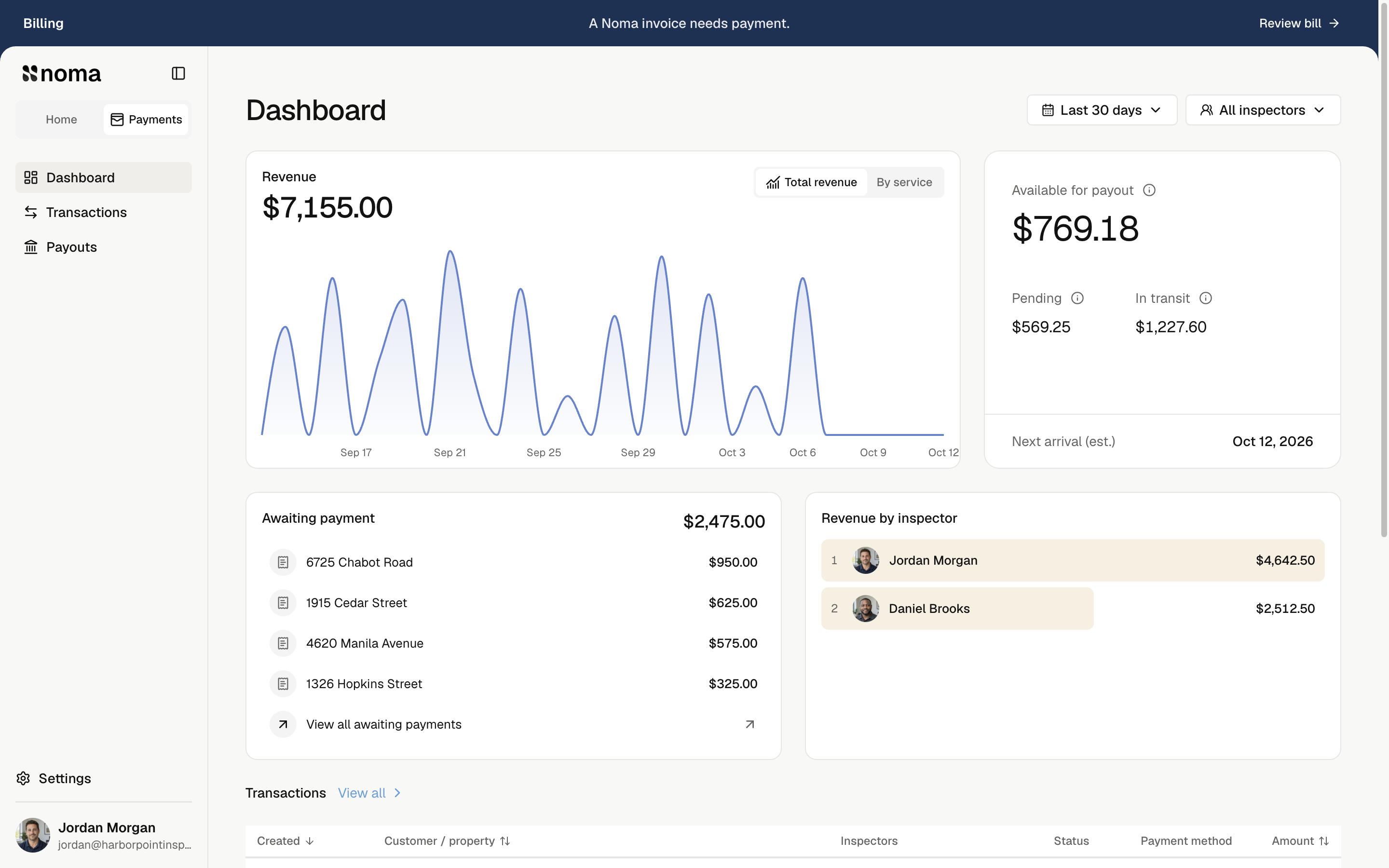
Choose dates and inspectors
The default is Last 30 days. Select a date range or inspectors. Dates use your company's time zone and the payment's received date.
Revenue includes successful invoice amounts received online or recorded outside Noma, including partial payments. Customer fees are excluded; company fees are not deducted. Voided outside payments no longer count.
Read the charts
- Total revenue shows selected revenue.
- By service groups it by service. Select a legend item to hide its line without changing the total.
- Revenue by inspector uses the team saved when each invoice was issued.
Multiple inspectors split invoice revenue equally. A $900 invoice with three inspectors gives each $300. Later assignment changes do not rewrite saved invoice teams.
Choose All inspectors for company-only authorized-work revenue too. Selecting every named inspector individually still shows only their shares.
Check unpaid money
Awaiting payment shows all current company debt, regardless of dates or inspectors. Select an invoice to review it.
Under Transactions, select View all to review and export invoices.
Revenue is separate from bank payouts. Money received outside Noma appears here but never enters the Noma payout balance.